
One board, from booked to installed.
FilmOptix dispatches the crew, checks the job is ready, and captures hours in the field — one record from the day it is booked to the day it is invoiced. No whiteboard, no phone tree, no re-keyed payroll hours.
Booked in one app, dispatched from a phone tree.
Build the day, not the chaos.
Assign crews to jobs and let FilmOptix build the day route. Every appointment is tied to the work order, so a double-booked crew gets flagged before it hits the road, not on-site.
- Crews assigned per job, per day
- Day routes built automatically
- Double-bookings flagged before they happen
- Every appointment tied to the work order
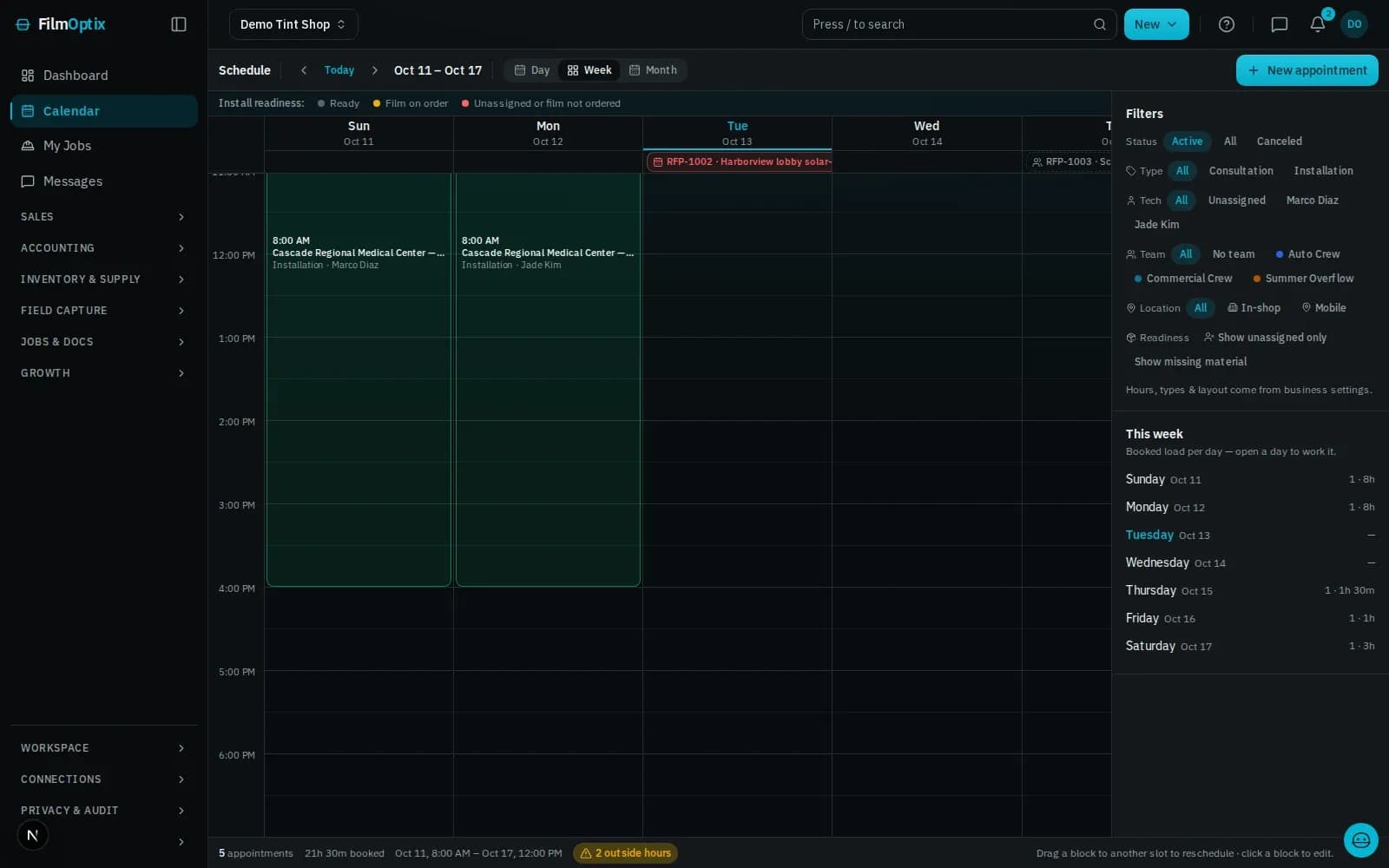
Nobody rolls until the job is ready.
A readiness check ties measurements and specs to the work order before a crew is dispatched. On site, the crew signs into the field app with mobile-auth, and worklogs capture their hours against the job.
- Readiness check ties specs to the work order
- Crew signs in through the field app
- Worklogs capture hours against the job
- Hours flow straight into payroll No re-entry
One board, booked to installed.
Build the day.
Assign crews to jobs and build the day route — every appointment tied to the work order.
Route the day automatically.
Stops sequence by day and crew, and a double-booking flags before it hits the road.
Verified before install.
A readiness check ties measurements and specs to the work order before the crew is dispatched.
The crew signs in from the field.
A mobile-auth login gets the crew into the job record on their own phone — no shared logins, no paper packets.
Hours that total themselves.
Worklogs capture time against the job in the field, and the hours flow straight into payroll.
Know what is where.
Track equipment assigned to a crew or job, so gear does not go missing between sites.
Scheduling and install are two steps. The record is the whole job.
- 01Lead
- 02Measure
- 03Quote
- 04Schedule
- 05Install
- 06Invoice
It starts as a lead
A web form or an inbound email lands as a lead and drops into the pipeline automatically.
Measure on the plan.
Take off panes and square footage straight from the plan PDF — nothing re-keyed by hand.
Quote in minutes.
Per-film Good/Better/Best pricing becomes a tokenized proposal your customer opens with one tap.
Schedule the crew.
Book the install, assign the crew, and route the day — every appointment tied to the work order.
Install and verify.
The crew works the job: photos, glass readings, and a readiness check attach to the record.
Get paid.
Deposit and balance collect against the job, and QuickBooks stays in sync — one record, closed out.
One job, six stages, one record.
It lands in the pipeline, not an inbox.
Lead forms · Mail intakeMeasured from the plans, once.
PDF takeoff · Per-room totalsPriced from the takeoff, opened with one tap.
Proposal · E-sign · DepositNested before a blade moves.
2-D nesting · Waste % · Roll inventoryOne board, crew to route.
Dispatch · Crew routes · Field appPaid against the job, synced to QuickBooks.
Invoicing · Payments · QuickBooksScheduling & install, answered.
Can it handle multiple crews at once?
Yes. The dispatch board assigns jobs to any number of crews and builds a day route for each — there is no cap on crews.
What happens when a job needs to be rescheduled?
Move the appointment on the dispatch board. FilmOptix reflags any crew conflicts against the new day, and the same work order and job record stay linked — nothing gets re-entered.
Does the installer need a phone or a laptop?
Just a phone. The field app runs through mobile-auth, so a crew member signs in on their own device and pulls up the job record, glass readings, and readiness check on site.
Can I get payroll hours out of it?
Worklogs capture hours against the job as the crew works it, and payroll totals directly from those logs — no separate timesheet to key in.
Does scheduling check the job is actually ready before dispatch?
Yes — a readiness check ties measurements and specs to the work order, so a job does not get dispatched until it is ready to install.
Bring a real week of jobs. Watch it get dispatched.
Send us a real week and we will route the crews, check readiness, and route the hours to payroll — on a single record.
Book a demo