
Invoice from the job. Track every dollar.
FilmOptix builds the invoice from the job record — deposit and balance, line by line — and keeps QuickBooks reconciled as payments land. No spreadsheet, no re-entry.
Invoiced twice, reconciled never.
Deposit and balance, against the job — not a separate app.
The invoice pulls straight from the job record: deposit due on acceptance, balance due at completion, one line-item list matched to the proposal. Nothing gets retyped between the quote and the bill.
- Deposit and balance milestones tied to the job
- Line items matched to the accepted proposal
- Payment status visible on the job record
- Customer POs attached before the invoice goes out
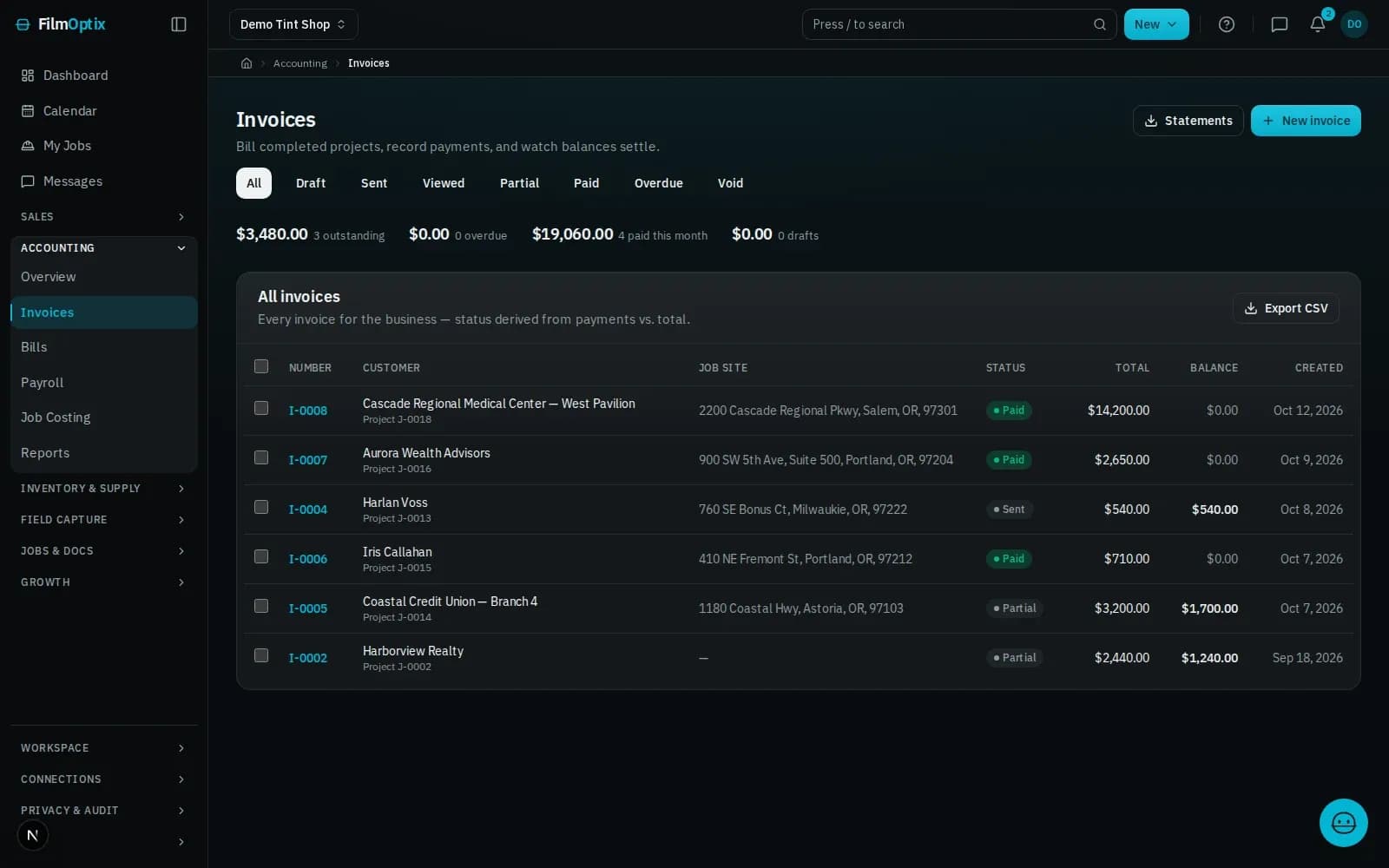
Estimated vs. actual, reconciled as you go.
Invoices and payments sync to QuickBooks automatically, so the ledger and the job never drift apart. Job costing tracks material and labor against the estimate while the job is still open, not after it closes.
- QuickBooks sync keeps invoices and payments reconciled
- Job costing compares estimated to actual, line by line
- No manual re-entry between systems
- Recurring subscriptions bill on schedule automatically
One invoice, everything reconciled.
Invoice from the job.
Deposit and balance invoices build from the same job record — no separate app, no retyping.
Deposit terms on the record.
Deposit and balance terms travel with the job. Card payment collection is in private beta; invoices post to the ledger either way.
Ledger and job, in sync.
Invoices and payments sync to QuickBooks automatically — no manual re-entry, no double bookkeeping.
Purchase orders on file.
Customer POs live on the job record, matched against the invoice before it goes out.
Estimated vs. actual.
Track material and labor cost against the estimate while the job is still open, not after it closes.
Recurring billing, handled.
Recurring service plans invoice on schedule automatically — no manual follow-up.
Invoice is one step. The record is the whole job.
- 01Lead
- 02Measure
- 03Quote
- 04Schedule
- 05Install
- 06Invoice
It starts as a lead
A web form or an inbound email lands as a lead and drops into the pipeline automatically.
Measure on the plan
Take off panes and square footage straight from the plan PDF — nothing re-keyed by hand.
Quote in minutes
Per-film Good/Better/Best pricing becomes a tokenized proposal your customer opens with one tap.
Schedule the crew
Book the install, assign the crew, and route the day — every appointment tied to the work order.
Install and verify
The crew works the job; photos, glass readings, and a readiness check attach to the record.
Get paid
Deposit and balance collect against the job, and QuickBooks stays in sync — one record, closed out.
One job, six stages, one record.
It lands in the pipeline, not an inbox.
Lead forms · Mail intakeMeasured from the plans, once.
PDF takeoff · Per-room totalsPriced from the takeoff, opened with one tap.
Proposal · E-sign · DepositNested before a blade moves.
2-D nesting · Waste % · Roll inventoryOne board, crew to route.
Dispatch · Crew routes · Field appPaid against the job, synced to QuickBooks.
Invoicing · Payments · QuickBooksInvoicing & payments, answered.
Do I need to collect a deposit before install?
Deposit terms are yours to set — due on acceptance, a percentage, or a flat amount — and FilmOptix tracks them against the balance due at completion. Nothing schedules until the terms you set are met.
Does this double-enter into QuickBooks?
No. Invoices and payments sync to QuickBooks automatically, so the ledger and the job record stay reconciled without a second pass of data entry.
Can a customer pay in installments?
Yes. Deposit and balance are separate line items on the job, and additional partial payments post against the same invoice as they come in.
How are tax rates handled?
Tax rates are set per job and carried onto the invoice with the line items — no separate tax calculation outside the record.
Can card payments go through FilmOptix directly?
Online card payments are in private beta. Today, invoices post to QuickBooks and payments are recorded against the job as they're received.
Bring a real job. Watch it get invoiced.
Send us a real proposal and we'll build the deposit and balance invoice live, sync it to QuickBooks, and show the job costing update — on a single record.
Book a demo